Finance & Accounting
How to Track Unpaid Bookings and Balances?
Maintain complete control over your cashflow by filtering outstanding guest balances and exporting financial reports in one click.
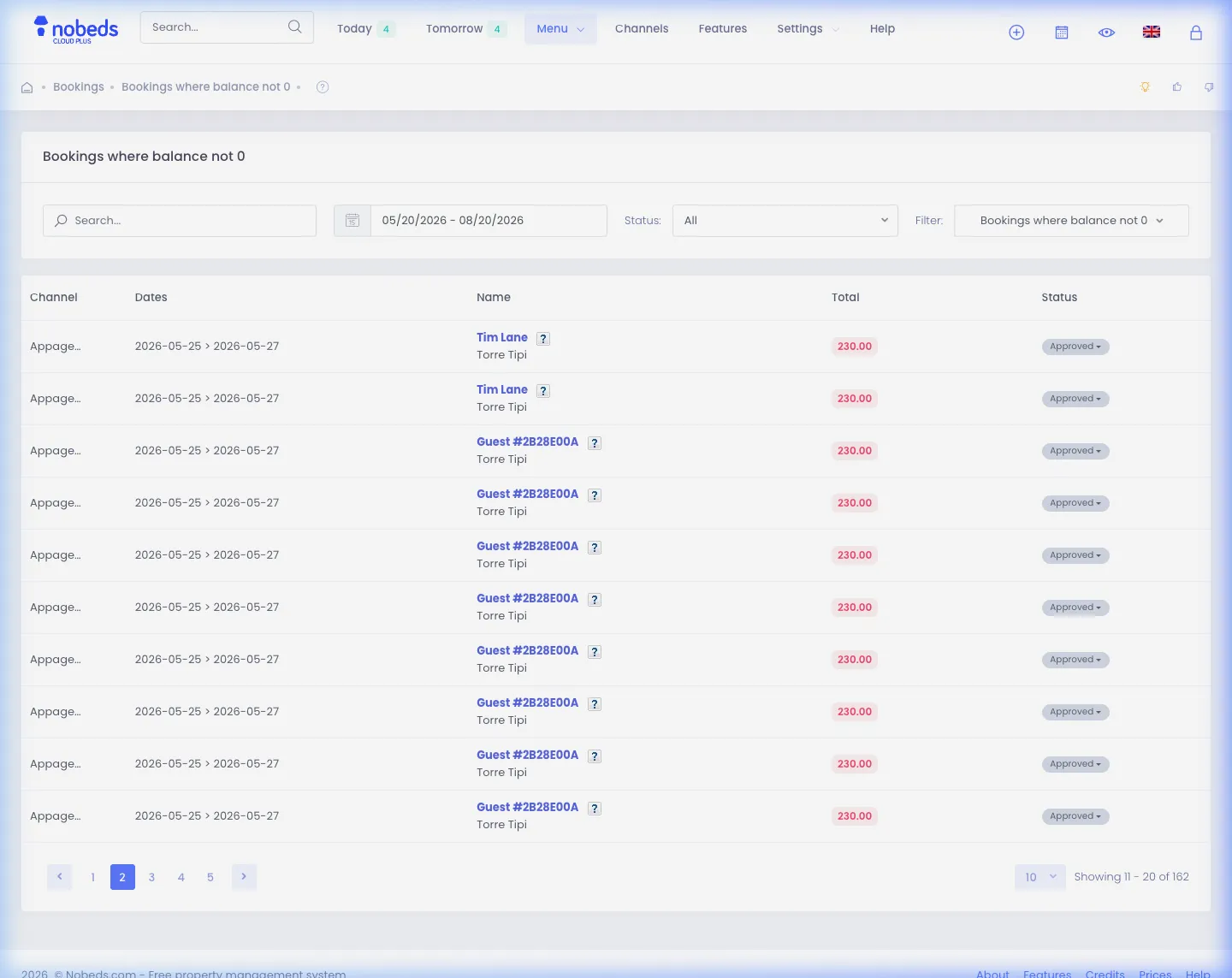
1. Filter Unpaid Reservations in Bookings List
Quickly locate all reservations with outstanding payment:
- Navigate to Bookings from the top navigation bar or visit
/Bookings/Index. - Click the Filter dropdown button above the bookings table.
- Select Balance not 0 (or
/Bookings/Index/Balance) to view all reservations where total price does not equal paid amount.
2. Record Received Payments & Update Balances
Update payment status when guests pay via bank, cash, or terminal:
- Click on any reservation row to open the booking details modal.
- In the Paid amount field, enter the newly received payment sum.
- Save the booking. The balance updates to zero and automatically marks the reservation as fully paid.
3. Export Financial Statements & Accounting Data
Generate reports for bookkeeping and property owners:
- From the Bookings page or Accounting > Sales, click the Export action.
- Download your complete reservation records in Excel (XLSX), CSV, or PDF.
- Export includes guest names, check-in/out dates, channels, room numbers, tax breakdown, and outstanding debt.
Important Financial Notes
- Online payments made via Stripe or SumUp are recorded and credited automatically to the booking.
- For manual bank transfers, always check your business bank account before updating the paid balance.
Pro Tips for Debt Management
- Check the "Balance not 0" filter daily before morning arrivals to collect payment at frontdesk.
- Generate separate owner revenue reports under Accounting to calculate net payouts effortlessly.
FAQ
Q:Can I filter by specific OTA channel balances?
Yes! You can combine the balance filter with channel selection (Booking.com, Airbnb, Direct) or date range filters.
Q:What happens if a guest overpays?
The balance will display as a negative figure indicating a credit/refund owed to the guest.
Q:Can my cleaning staff see financial balances?
No. If you assign the Cleaner or Housekeeping role, financial figures and balances are hidden.
Accounting & Balance Guide
Click to Enlarge

Click to Enlarge

Click to Enlarge
Checklist
- One-click "Balance not 0" filter
- Real-time payment tracking
- Automated Stripe/SumUp credit
- Excel / CSV / PDF export