How to set different rates for different channels?
Easily cover OTA commission fees or adjust prices for individual channels by setting percentage markups or fixed extra charges.
Channel-Specific Extra Rates
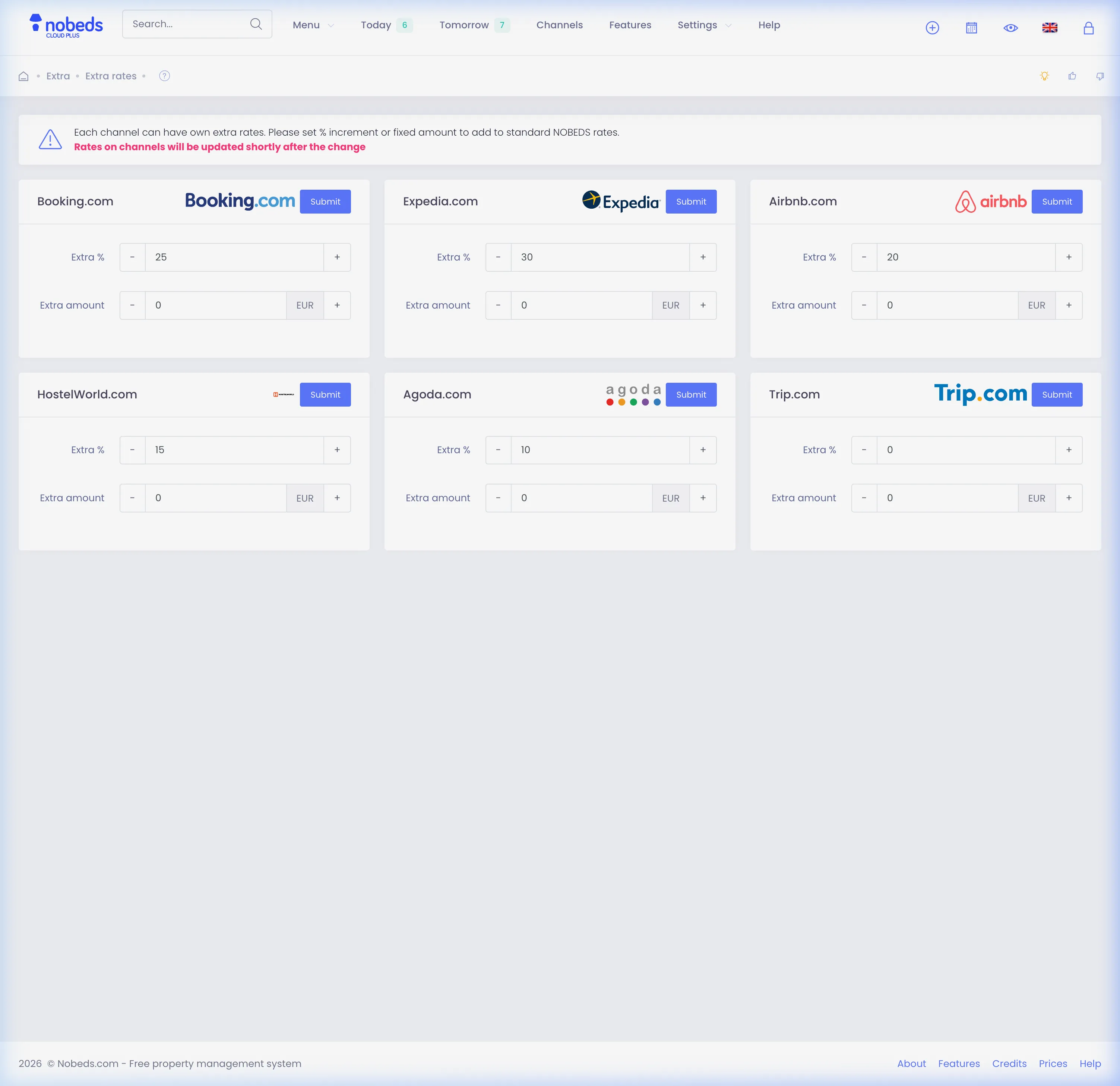
The NOBEDS system allows you to automatically adjust rates for each connected OTA channel (such as Booking.com, Airbnb, Expedia, HostelWorld, Agoda, and Trip.com) individually to offset commission fees or run specific pricing strategies.
Step-by-step Configuration:
- Go to Settings in your main dashboard and click on the Extra Rates card.
- On the Extra Rates page, you will see separate cards for each connected OTA channel.
- For each channel, you can configure two types of adjustments:
- Extra %: A percentage markup added to your base rate (e.g., enter 15 to add 15% markup to cover Booking.com commission).
- Extra amount: A fixed monetary value added to the daily rate (e.g., enter 5 to add $5 to every night). - Click the Save button on the card of the channel you want to update.
- The system will save the new rules and push updated prices to the channel shortly.